
Toyota Sienna Service Manual: ECM
COMPONENTS
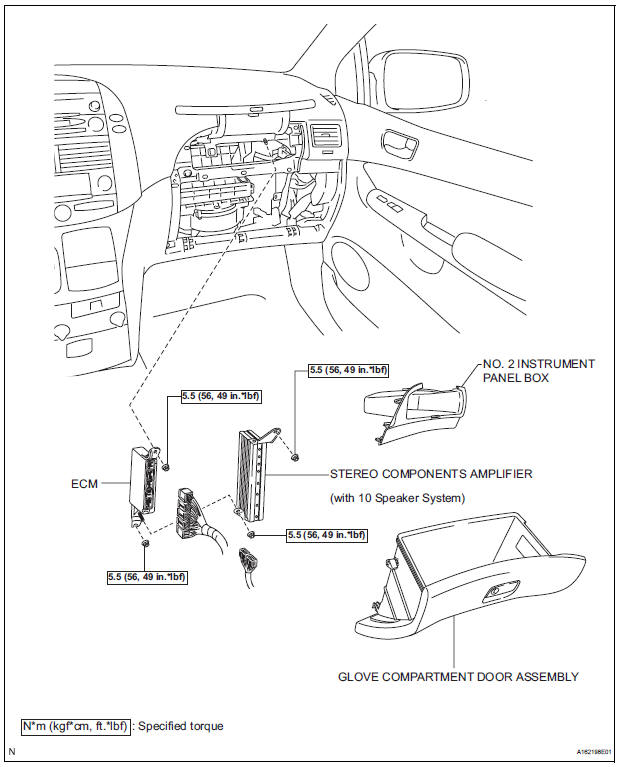
REMOVAL
1. REMOVE GLOVE COMPARTMENT DOOR ASSEMBLY
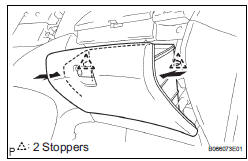
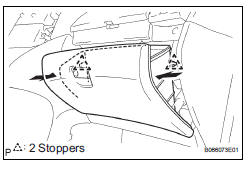
(a) Push the right side wall and then push the left wall to release the stoppers.
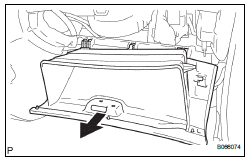
(b) Pull the glove compartment door sub-assembly rearward to remove it.
2. REMOVE NO. 2 INSTRUMENT PANEL BOX
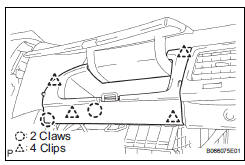
(a) Disengage the 2 claws and 4 clips, and remove the No. 2 instrument panel box.
3. REMOVE ECM
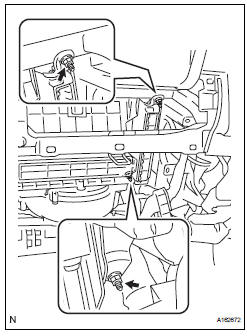
(a) Disconnect the 5 ECM connectors.
(b) Remove the 2 nuts and ECM.
4. REMOVE ECM (with 10 speakers system)
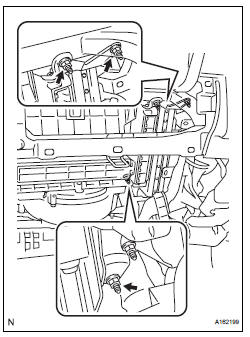
(a) Disconnect the 5 ECM connectors and 2 stereo components amplifier connectors.
(b) Remove the 4 nuts and the ECM with the stereo components amplifier.
INSTALLATION
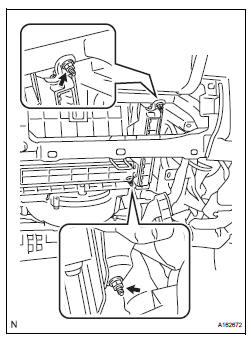
1. INSTALL ECM
(a) Install the ECM with the 2 nuts.
Torque: 5.5 N*m (56 kgf*cm, 49 in.*lbf) (b) Connect the 5 ECM connectors.
2. INSTALL ECM (with 10 speakers system)
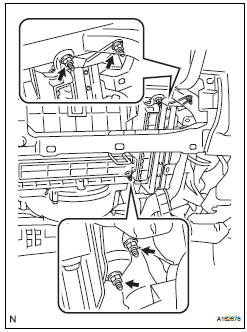
(a) Install the ECM and stereo components amplifier with the 4 nuts.
Torque: 5.5 N*m (56 kgf*cm, 49 in.*lbf) (b) Connect the 5 ECM connectors and 2 stereo components amplifier connectors.
3.INSTALL NO. 2 INSTRUMENT PANEL BOX
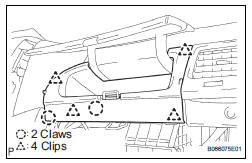
(a) Install the No. 2 instrument panel box.
4. INSTALL GLOVE COMPARTMENT DOOR ASSEMBLY
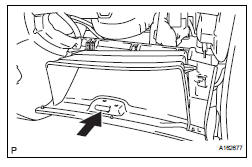
(a) Install the glove compartment door sub-assembly frontward to install it.
(b) Push the right side wall and then push the left wall to install the stoppers.
5. PERFORM REGISTRATION
(a) When replacing the ECM, perform distance control ECU recognition in ECM (See page CC-125).
 Installation
1. INSTALL THROTTLE BODY
(a) Install a new throttle body gasket to the intake air
surge tank.
(b) Install the throttle body with the 4 bolts.
Torque: 10 N*m (102 kgf*cm, 7 ft.*lbf)
...
 Accelerator pedal rod
COMPONENTS
ON-VEHICLE INSPECTION
1. CHECK ACCELERATOR PEDAL ROD
(a) Check the voltage.
(1) Connect the intelligent tester to the DLC3.
(2) Turn the ignition switch to the ON position.
...
Other materials:
Screen for general settings
Press the “SETUP� button.
Select “General� on the “Setup�
screen.
Select to adjust the clock.
“Englishâ€�, “Françaisâ€� or
“Españolâ€� can be selected.
On/off can be selected to
sound beeps.
Select to change the screen
color.
Select ...
How to proceed with
troubleshooting
HINT:
Use these procedures to troubleshoot the power folding
seat system.
*: Use the intelligent tester.
1 VEHICLE BROUGHT TO WORKSHOP
2 INSPECT BATTERY VOLTAGE
Standard voltage:
10 to 14 V
If the voltage is below 11 V, recharge or replace the battery
before proceeding.
...
Disassembly
1. REMOVE RETURN TUBE NO.2
(a) Using SST, remove the return tube No. 2.
SST 09023-12701
2. REMOVE STEERING LEFT TURN PRESSURE TUBE
(a) Using SST, remove the left turn pressure tube.
SST 09023-38201
(b) Remove the 2 O-rings from the left turn pressure
tube.
3. REMOVE STEERING RIGH ...
