
Toyota Sienna Service Manual: Installation
HINT: Install the RH side by the same procedure as the LH side.
1. INSTALL REAR DISC BRAKE CYLINDER MOUNTING LH
(a) Install the rear disc brake cylinder mounting LH with the 2 bolts.
Torque: 88 N*m (900 kgf*cm, 65 ft.*lbf)
2. INSTALL REAR DISC BRAKE PAD SUPPORT PLATE
(a) Install the rear disc brake pad support plate (No. 1) and rear disc brake pad support plate (No. 2) to the rear disc brake cylinder mounting LH.
3. INSTALL REAR DISC BRAKE ANTI SQUEAL SHIM KIT
NOTICE: If necessary, replace the anti squeal shim kit when replacing the brake pad.
(a) Apply disc brake grease to each anti squeal shim No. 1.
(b) Install anti squeal shims No. 1 and anti squeal shim No. 2 on each pad.
4. INSTALL DISC BRAKE PAD KIT REAR (PAD ONLY)
(a) Install the brake pad kit rear to the rear disc brake cylinder mounting LH.
NOTICE: There should be no oil or grease on the friction surfaces of the pads and the disc.
5. INSTALL DISC BRAKE CYLINDER ASSEMBLY REAR LH
(a) Install the disc brake cylinder assembly rear LH with the 2 bolts.
Torque: 34 N*m (350 kgf*cm, 25 ft.*lbf)
6. CONNECT REAR LH FLEXIBLE HOSE
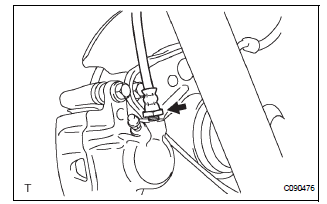
(a) Using SST, Install the rear brake flexible hose.
SST 09023-12701 Torque: 23 N*m (235 kgf*cm, 17 ft.*lbf)
7. CONNECT REAR BRAKE TUBE NO.4
(a) Install the clip and connect the rear brake flexible hose.
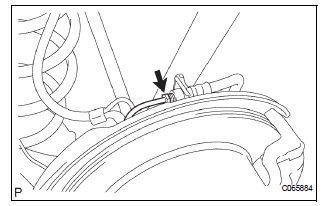
(b) Using SST and a spanner, connect the rear brake tube No. 4.
SST 09023-00101 Torque: 15 N*m (155 kgf*cm, 11 ft.*lbf)
8. FILL RESERVOIR WITH BRAKE FLUID (See page BR- 3)
9. BLEED BRAKE MASTER CYLINDER (See page BR-3)
10. BLEED BRAKE LINE (See page BR-4)
11. BLEED BRAKE ACTUATOR (w/ VSC) (See page BR- 4)
12. CHECK FLUID LEVEL IN RESERVOIR (See page BR- 7)
13. CHECK BRAKE FLUID LEAKAGE
14. INSTALL REAR WHEEL Torque: 103 N*m (1,050 kgf*cm, 76 ft.*lbf)
 Reassembly
1. INSTALL REAR DISC
(a) Aligning the matchmarks, install the rear disc.
HINT:
Select the installation position where the disc has
the minimum runout.
2. INSPECT DISC RUNOUT
(a) Temporarily ...
 Rear drum brake
Components
...
Other materials:
Dtc check / clear
1. DTC CHECK (USING SST CHECK WIRE)
(a) Check DTCs.
(1) Turn the ignition switch off.
(2) Using SST, connect terminals TC and CG of
DLC3.
SST 09843-18040
(3) Turn the ignition switch to the ON position.
(4) Read and record any DTCs from the tire
pressure warning light on the combin ...
Installation
1. INSTALL BRAKE ACTUATOR
NOTICE:
Do not remove the hole plugs before connecting the
brake tubes. New actuators are filled with brake
fluid.
(a) Install the brake actuator assembly with the 2 nuts.
Torque: 5.4 N*m (55 kgf*cm, 48 in.*lbf)
2. INSTALL BRAKE ACTUATOR WITH BRACKET
(a) Insta ...
Front Occupant Classification Sensor LH Circuit
Malfunction
DTC B1780 Front Occupant Classification Sensor LH Circuit
Malfunction
DESCRIPTION
The front occupant classification sensor LH circuit consists of the occupant
classification ECU and the
front occupant classification sensor LH.
DTC B1780 is recorded when a malfunction is detected in the fron ...
