
Toyota Sienna Service Manual: Installation
1. INSTALL AMPLIFIER ANTENNA ASSEMBLY
- Engage the 16 clamps to install the amplifier antenna assembly.
- Install the 3 bolts.
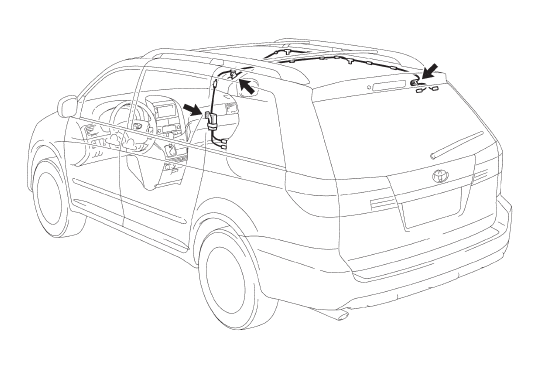
- Connect the connectors.
2. INSTALL ROOF HEADLINING ASSEMBLY
3. INSTALL ANTENNA ASSEMBLY WITH HOLDER
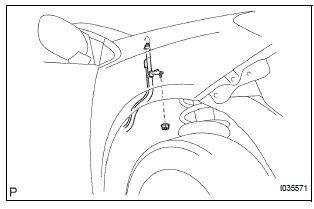
- Install the antenna assembly with holder with the nut.
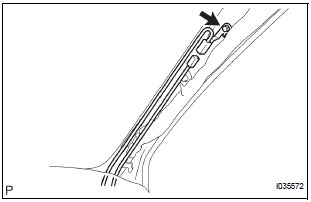
- Install the bolt and connect the connector.
4. INSTALL ANTENNA ORNAMENT
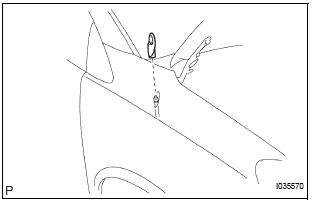
- Install the antenna ornament.
5. INSTALL PULL TOP ANTENNA POLE SUBASSEMBLY
6. INSTALL ANTENNA CORD SUB-ASSEMBLY
- Engage the 5 clamps to install the antenna cord sub-assembly.
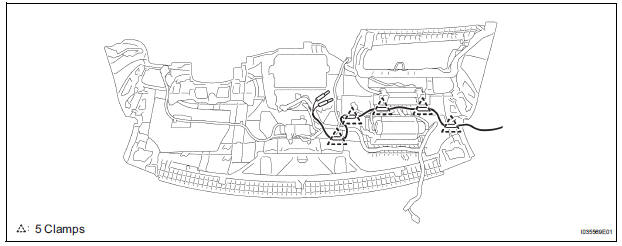
7. INSTALL INSTRUMENT PANEL SAFETY PAD SUBASSEMBLY
 Removal
1. REMOVE INSTRUMENT PANEL SAFETY PAD SUBASSEMBLY
2. REMOVE ANTENNA CORD SUB-ASSEMBLY
Replace the 5 clamps and remove the antenna cord
sub-assembly.
3. REMOVE PULL TOP ANTENNA POLE S ...
 Radio antenna pole
COMPONENTS
REMOVAL
1. REMOVE PULL TOP ANTENNA POLE SUBASSEMBLY
Remove the pull top antenna pole sub-assembly by
pulling it the arrow direction in the illustration.
INSTALLATION
...
Other materials:
Installation
1. INSTALL AIR FUEL RATIO SENSOR (for Bank 2
Sensor 1)
(a) Using SST, install the sensor to the exhaust
manifold LH.
SST 09224-00010
Torque: 40 N*m (408 kgf*cm, 30 ft.*lbf) for use
with SST
44 N*m (449 kgf*cm, 32 ft.*lbf) for use
without SST
HINT:
Use a torque wrench with a fulcrum ...
Terminals of ECU
1. TELEVISION CAMERA ASSEMBLY
Disconnect the T10 camera connector
Measure the voltage and resistance of each
terminal of the wire harness side connector.
If the result is not as specified, there may be a
malfunction on the wire harness side.
Reconnect the T10 ...
Opening/closing the sliding door
Sliding door handle
Open/close
Vehicles with power sliding
doors: The sliding door will be
automatically and completely
opened and closed by the following.
Pulling the outside handle.
Sliding the inside handle forward
to close or backward to
open.
Power sliding door switches (v ...
