
Toyota Sienna Service Manual: Installation
1. INSTALL STARTER ASSEMBLY
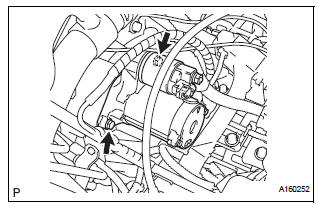
(a) Install the starter with the 2 bolts.
Torque: 37 N*m (380 kgf*cm, 26 ft.*lbf) for bolt
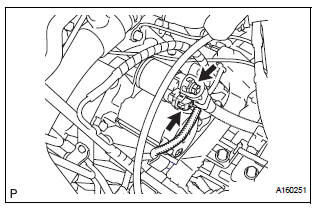
(b) Connect the starter connector.
(c) Install the terminal nut and cover the nut with the cap.
Torque: 9.8 N*m (100 kgf*cm, 7 ft.*lbf) for nut
2. INSTALL NO. 1 AIR CLEANER INLET
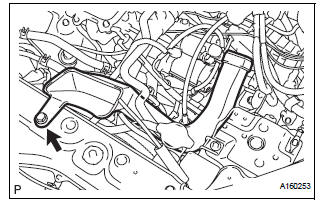
(a) Install the No. 1 air cleaner inlet with the bolt.
Torque: 5.0 N*m (51 kgf*cm, 44 in.*lbf)
3. INSTALL AIR CLEANER BRACKET
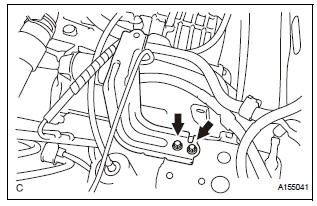
(a) Remove the 2 bolts and air cleaner bracket.
Torque: 7.8 N*m (80 kgf*cm, 69 in.*lbf)
4. INSTALL AIR CLEANER CASE SUB-ASSEMBLY (See page EM-59) 5. INSTALL AIR CLEANER FILTER ELEMENT (See page EM-59) 6. INSTALL AIR CLEANER CAP SUB-ASSEMBLY (See page FU-20) 7. INSTALL NO. 2 AIR CLEANER INLET (See page EM- 60) 8. INSTALL BATTERY (See page EM-59)
 Reassembly
1. INSTALL PLANETARY GEAR
(a) Apply grease to the planetary gears and pin parts of
the planetary shaft.
(b) Install the 3 planetary gears.
2. INSTALL STARTER ARMATURE ASSEMBLY
(a) Apply ...
 Starter relay
On-vehicle inspection
1. Inspect starter relay
(a) Using an ohmmeter, measure the resistance
between each terminal.
Standard resistance
If the result is not as specified, replace the starter ...
Other materials:
Reassembly
1. INSTALL SHOCK ABSORBER ASSEMBLY FRONT LH
2. INSTALL FRONT COIL SPRING INSULATOR LOWER
LH
(a) Install the front coil spring insulator lower LH onto
the shock absorber assembly front LH.
3. INSTALL FRONT SPRING BUMPER LH
(a) Install the front spring bumper LH to the piston rod.
4. INSTALL FR ...
On-vehicle inspection
1. INSPECT COOLER CONDENSER CORE
(a) If the fin of the cooler condenser core is dirty, clean
it with water and dry it with compressed air.
NOTICE:
Do not damage the fin of the cooler condenser
core.
(b) If the fin of the cooler condenser core is bent, make
it straight using a screwdriver or p ...
Things you should know
If you notice any symptoms
If you notice any of the following symptoms, refer to the likely cause
and the solution, and re-check.
If the symptom is not resolved by the solution, have the vehicle
inspected by your Toyota dealer.
Likely cause
Solution
The ima ...
