
Toyota Sienna Service Manual: Power Slide Door RH does not Operate When Satellite Switch is Pressed
DESCRIPTION
- The power slide door operates only when the power slide door main switch is ON (switch free: orange paint on the top of the switch appears). The power slide door ECU RH controls the power slide door RH, which activates the slide door motor to open / close the slide door.
- A request signal from the satellite switch for the power slide door RH is input to the the driver side junction block ECU, which then sends this request signal using a BEAN line to the power slide door ECU RH.
- A request signal from the power slide door control switch RH is directly input to the power slide door ECU RH.
- When the child lock is in the locked condition, the power slide door control switch RH is disabled, thus the power slide door RH is not activated by this switch.
- When the touch sensor has an open / short-circuit, closing of the power slide door is disabled.
NOTICE: When disconnecting the negative (-) terminal cable of the battery or control motor and clutch, initialize the power slide door system
WIRING DIAGRAM
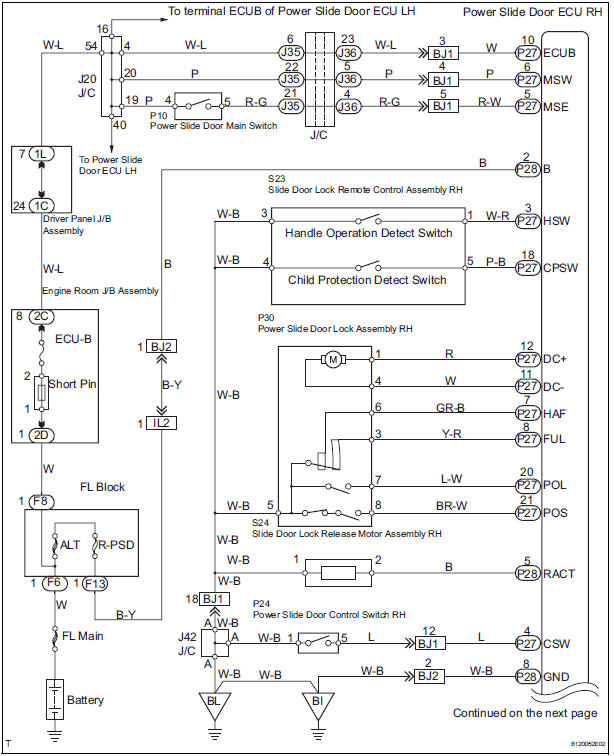
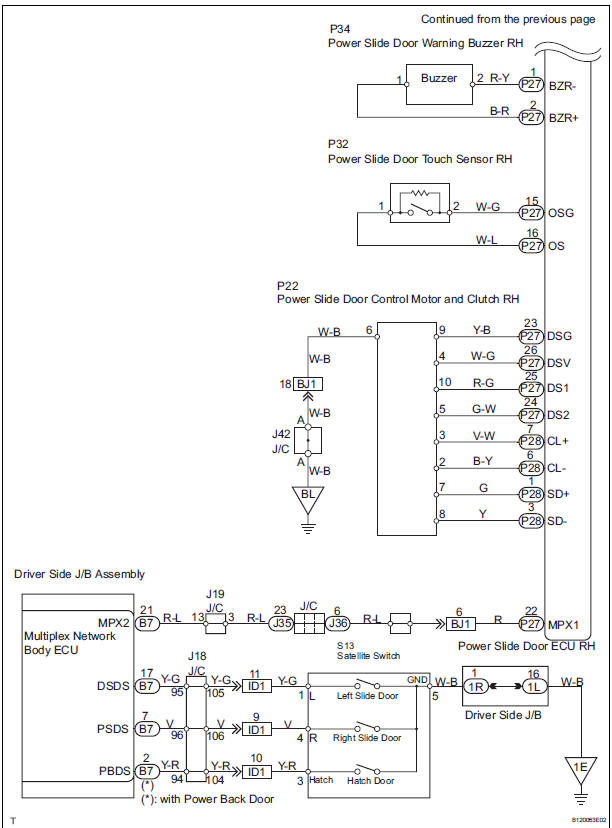
 Inspection procedure
1 BASIC INSPECTION
Check the conditions necessary for the power slide door
to open:
Power slide door main switch is in the ON position
(switch free: orange paint on the top of the ...
 Inspection procedure
1 BASIC INSPECTION
Conditions necessary for the power slide door to open:
Power slide door main switch is in the ON position
(switch free: orange paint on the top of the switch
appears). ...
Other materials:
Adjustment procedure
Manual seat
Seat position adjustment lever
Seatback angle adjustment lever
Vertical height adjustment lever (driver’s side only)
Lumbar support adjustment switch (driver’s side only)*
*: If equipped
Power seat
Seat position adjustment switch
Seatback angle a ...
Brake Switch "B" Circuit High
DESCRIPTION
The purpose of this circuit is to prevent the engine from stalling while
driving in lock-up condition when
brakes are suddenly applied.
When the brake pedal is depressed, this switch sends a signals to the ECM. Then
the ECM cancels the
operation of the lock-up clutch while ...
Knock sensor
COMPONENTS
REMOVAL
1. DISCHARGE FUEL SYSTEM PRESSURE
(See page FU-13)
2. REMOVE V-BANK COVER SUB-ASSEMBLY (See
page EM-28)
3. DRAIN ENGINE COOLANT (See page CO-6)
4. REMOVE WINDSHIELD WIPER MOTOR ASSEMBLY
HINT:
(See page WW-4)
5. REMOVE FRONT OUTER COWL TOP PANEL SUBASSEMBLY
( ...
