
Toyota Sienna Service Manual: Radio and Navigation Assembly Power Source Circuit
DESCRIPTION
This is the power source circuit to operate the radio and navigation assembly.
WIRING DIAGRAM
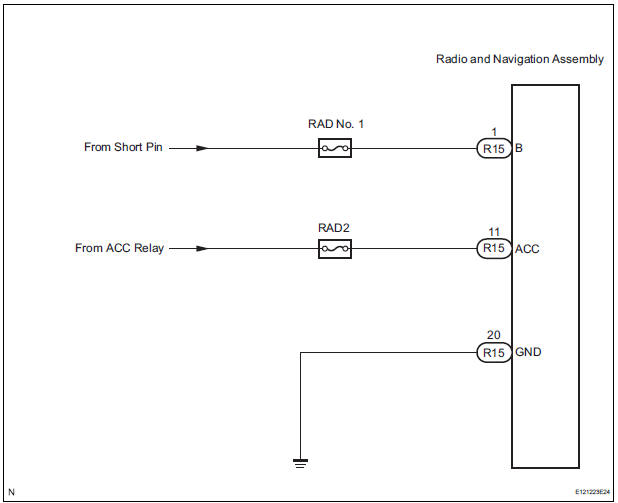
INSPECTION PROCEDURE
1 INSPECT RADIO AND NAVIGATION ASSEMBLY
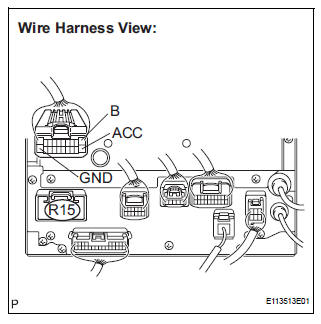
- Disconnect the radio and navigation assembly connector R15.
- Measure the resistance according to the value(s) in the table below.
Standard resistance

- Measure the voltage according to the value(s) in the table below.
Standard voltage

PROCEED TO NEXT CIRCUIT INSPECTION SHOWN IN PROBLEM SYMPTOMS TABLE
 Stereo Component Amplifier Power Source Circuit
DESCRIPTION
This circuit provides power to the stereo component amplifier.
WIRING DIAGRAM
INSPECTION PROCEDURE
1 INSPECT STEREO COMPONENT AMPLIFIER
Disconnect the stereo component ampl ...
 Television Display Power Source Circuit
DESCRIPTION
This is the power source circuit to operate the television display assembly.
WIRING DIAGRAM
INSPECTION PROCEDURE
1 INSPECT TELEVISION DISPLAY ASSEMBLY
Disconnect the connec ...
Other materials:
Air Mix Damper Control Servo Motor Circuit (Passenger Side)
DESCRIPTION
The air mix control servo motor (air mix damper servo sub-assembly) is
controlled by the A/C amplifier.
The air mix control servo motor moves the air mix damper by rotating (normal,
reverse) with electrical
power from the A/C amplifier.
This adjusts the mix ratio of the air t ...
CD Abnormal/ Excess Current/ Tray Insertion / Ejection Error/ CD Abnormal/
Excess Current/ Tray Insertion / Ejection Error
DTC 62-44 CD Abnormal
DTC 62-48 Excess Current
DTC 62-50 Tray Insertion / Ejection Error
DTC 63-44 CD Abnormal
DTC 63-48 Excess Current
DTC 63-50 Tray Insertion / Ejection Error
DESCRIPTION
DTC No.
DTC Detecting Condition
Trouble Area
62-44
Operation error ...
TC and CG Terminal Circuit
DESCRIPTION
Connecting terminals TC and CG of the DLC3 causes the ECU to display the DTC
by blinking the ABS
warning light and/or VSC warning light.
WIRING DIAGRAM
INSPECTION PROCEDURE
NOTICE:
When replacing the brake actuator assembly, perform zero point calibration
(See page BC-70).
...
