
Toyota Sienna Service Manual: Read vin (vehicle identification number)
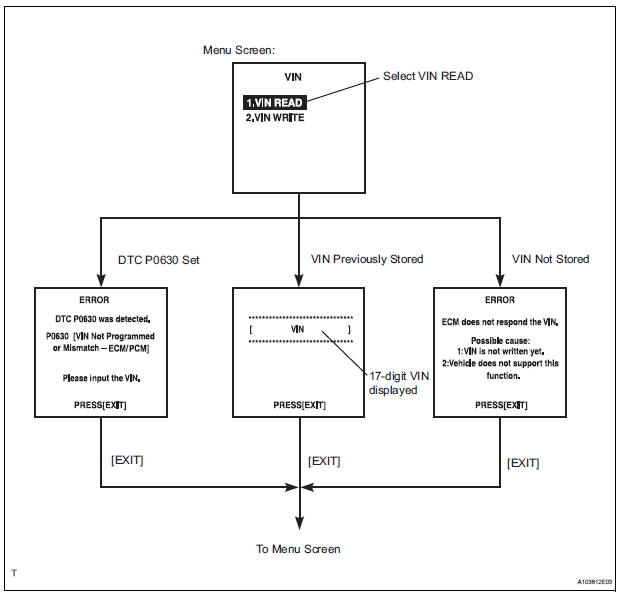
(a) The VIN reading process is shown in the flowchart below. Reading the VIN stored in the ECM is necessary when comparing it to the VIN provided with the vehicle.
(b) Read the VIN using the intelligent tester.
(c) Check the vehicle's VIN.
(d) Connect the intelligent tester to the DLC3.
(e) Turn the ignition switch to the ON position.
(f) Turn the tester ON.
(g) Enter the following menus: DIAGNOSIS / ENHANCED OBD II / VIN.
 Input instructions
(a) The general VIN input instructions using the
intelligent tester are shown below:
(b) The arrow buttons (UP, DOWN, RIGHT and LEFT)
and numerical buttons (0 to 9) are used to input the
VIN.
( ...
 Write vin
(a) The VIN writing process is shown in the flowchart
below. This process allows the VIN to be input into
the ECM. If the ECM is changed, or the ECM VIN
and Vehicle VIN do not match, the VIN can be ...
Other materials:
Short to B+ in Rear Curtain Shield Squib LH
Circuit
DTC B1638/86 Short to B+ in Rear Curtain Shield Squib LH
Circuit
DESCRIPTION
The rear curtain shield squib LH circuit consists of the center airbag sensor
assembly and the curtain
shield airbag assembly LH.
The circuit instructs the SRS to deploy when deployment conditions are met.
DTC B ...
Indicator Circuit
DESCRIPTION
This system has two indicator lights. One of the indicator lights is built
into the fold seat switch. This
indicator light receives power from the fold seat control ECU. It comes on or
blinks when the system
detects that an object is caught or when the seat operation conditions ar ...
Canceling the power back door system (vehicles with power
back door)
Turn the main switch off to disable
the power back door system.
Off
On*
*: The orange line at the top of the
switch indicates that the power
back door system is on.
Luggage compartment light
The luggage compartment light turns on
when the back door is opened with the
luggage ...
