
Toyota Sienna Service Manual: Reassembly
1. INSTALL UNDERDRIVE CLUTCH DRUM O-RING
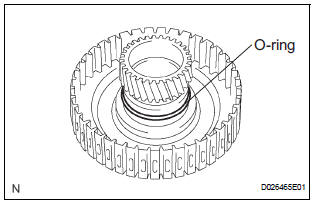
(a) Coat a new O-ring with ATF, and install it to the underdrive clutch drum.
NOTICE: Make sure that the O-ring is not twisted or pinched.
2. INSTALL UNDERDRIVE CLUTCH PISTON SET
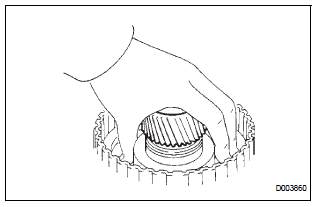
(a) Coat the underdrive clutch piston with ATF, and install it to the underdrive clutch piston drum.
NOTICE:
- Be careful not to damage the O-ring.
- Be careful not to damage the lip of the piston.
3. INSTALL UNDERDRIVE CLUTCH RETURN SPRING SUB-ASSEMBLY
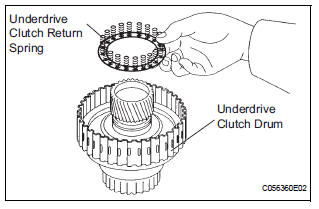
(a) Install the return spring to the underdrive clutch drum.
NOTICE: Installing the spring sub-assembly, check that all of the springs are fit in the piston correctly.
(b) Coat the clutch balancer with ATF.
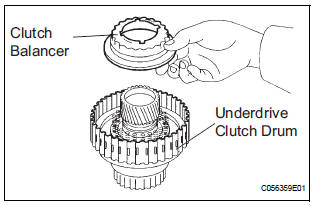
(c) Install the clutch balancer to the underdrive clutch drum.
NOTICE: Be careful not to damage the lip of the clutch balancer.
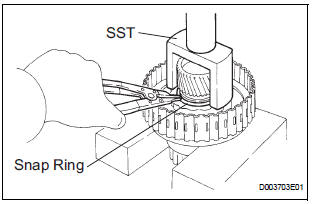
(d) Place SST on the clutch balancer and compress the piston return spring with a press.
SST 09350-32014 (09351-32070)
(e) Using a snap ring expander, install the snap ring to the underdrive clutch drum.
(f) Be sure that the end gap of the snap ring is not aligned with the spring retainer claw.
NOTICE:
- Stop the press when the spring seat is lowered to the place 1 to 2 mm (0.039 to 0.078 in.) from the snap ring groove.
- This prevents the spring seat from being deformed
- Do not expand the snap ring excessively.
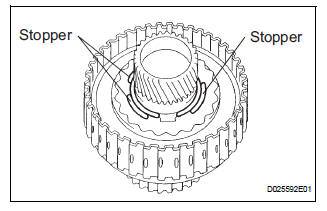
(g) Set the end gap of the snap ring in the underdrive clutch drum as shown in the illustration.
NOTICE: The end gap of the snap ring should not align with any of the stoppers.
4. INSTALL UNDERDRIVE CLUTCH DISC NO.1
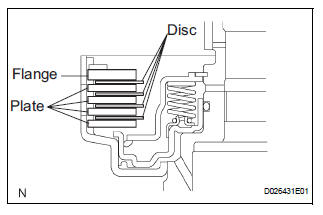
(a) Coat the 4 discs with ATF.
(b) Install the 4 plates, 4 discs and flange to the underdrive clutch drum.
NOTICE: Make sure that the plates, discs, and flange are installed as shown in the illustration.
5. INSTALL 1ST & REVERSE BRAKE RETURN SPRING SHAFT SNAP RING
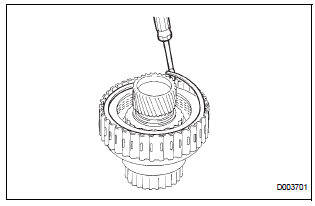
(a) Using a screwdriver, install the underdrive clutch flange No.2 hole snap ring.
(b) Check that the end gap of snap ring is not aligned with one of the cutouts.
NOTICE: The snap ring should be fully engaged in the groove of the drum.
6. INSPECT UNDERDRIVE PACK CLEARANCE
HINT: (See page AX-262)
 Inspection
1. INSPECT UNDERDRIVE PACK CLEARANCE
(a) Install the underdrive clutch to the transaxle case.
NOTICE:
Be careful not to damage the oil seal rings.
(b) Install a dial indicator as shown in the ...
 Differential case
COMPONENTS
...
Other materials:
Master Reset/ Voice Processing Device ON Error
DTC 01-DD Master Reset
DTC 01-E1 Voice Processing Device ON
DESCRIPTION
DTC No.
DTC Detection Condition
Trouble Area
01-DD
*1
The device that should be the master has been
disconnected after the engine starts.
Radio and navigation assembly po ...
Throttle Actuator Control Throttle Body Range /
Performance
DTC P2119 Throttle Actuator Control Throttle Body Range /
Performance
DESCRIPTION
The Electronic Throttle Control System (ETCS) is composed of the throttle
actuator, Throttle Position (TP)
sensor, Accelerator Pedal Position (APP) sensor, and ECM. The ECM operates the
throttle actuator to
re ...
Rear door lock
INSPECTION
1. INSPECT REAR DOOR LOCK ACTUATOR ASSEMBLY LH
Apply battery voltage to the door lock and check
operation of the motor.
OK
HINT:
If the result is not as specified, replace the door lock
assembly.
Measure the resistance according to the value(s) in
the ...
