
Toyota Sienna Service Manual: The Other Caller cannot Hear Your Voice, or Your Voice is too Quiet or Distorted
INSPECTION PROCEDURE
1 CHECK CELLULAR PHONE
- Check if the other side can hear your voice properly.
OK: Your voice can be heard correctly.
2 CHECK SETTINGS
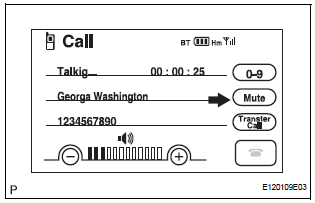
- Check if the mute switch is set to ON.
OK: Mute switch is not set to ON.
3 CHECK SETTINGS
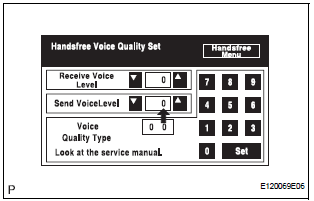
- Enter the "Handsfree Voice Quality Set" mode.
- Check if the Send Voice Level is set to "0".
HINT: The Send Voice Level can be set to 11 different levels, -5 to +5, with a 3 dB difference.
- Check if the Send Voice Level minimum or maximum level.
HINT: When the Send Voice Level is set to the minimum or maximum level, the sound may be distorted.
OK: The Send Voice Level is set to "0".
4 CHECK MICROPHONE (NAVIGATION CHECK MODE)
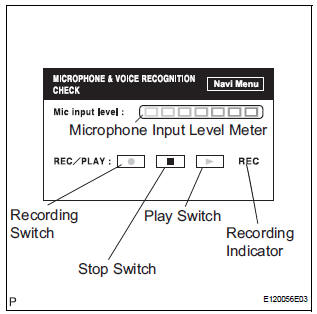
- Enter the "MICROPHONE & VOICE RECOGNITION CHECK" mode.
- When voice is input into the microphone, check that the microphone input level meter changes according to the input voice.
- Push the recording switch and perform voice recording.
HINT: Voice can be recorded up to 5 seconds.
- Check that the recording indicator remains on while recording and that the recorded voice is played normally without noise or distortion.
OK: All check results are normal.
REPLACE RADIO AND NAVIGATION ASSEMBLY
 The Other Caller's Voice cannot be Heard, is too Quiet, or Distorted
INSPECTION PROCEDURE
1 CHECK CELLULAR PHONE
Check if the voice on the other side can be heard using a
cellular phone.
OK:
Voice can be heard
2 CHECK NAVIGATION SYSTEM
Check that naviga ...
 Black Screen
INSPECTION PROCEDURE
1 CHECK DISPLAY SETTING
Check that the display is not in "Screen OFF" mode.
OK:
The display setting is not in "Screen OFF" mode.
2 CHECK IMAGE QUALIT ...
Other materials:
Short in Front Pretensioner Squib LH Circuit
DTC B0135/73 Short in Front Pretensioner Squib LH Circuit
DESCRIPTION
The front pretensioner squib LH circuit consists of the center airbag sensor
assembly and the front seat
outer belt assembly LH.
This circuit instructs the SRS to deploy when deployment conditions are met.
DTC B0135/73 ...
Reassembly
1. INSTALL PLANETARY GEAR
(a) Apply grease to the planetary gears and pin parts of
the planetary shaft.
(b) Install the 3 planetary gears.
2. INSTALL STARTER ARMATURE ASSEMBLY
(a) Apply grease to the plate washer and the armature
shaft.
(b) Install the starter armature to the star ...
Precaution
1. PRECAUTION
(a) Before inspecting and repairing the fuel system,
disconnect the cable from the negative (-) battery
terminal.
(b) Do not smoke or work near fire when handling the
fuel system.
(c) Keep gasoline away from rubber or leather parts.
2. DISCHARGE FUEL SYSTEM PRESSURE (*1)
...
