
Toyota Sienna Service Manual: Transmission Error
DTC 01-DC Transmission Error
DESCRIPTION
|
DTC No. |
DTC Detection Condition |
Trouble Area |
| 01-DC *1 | Transmission to component shown by sub-code failed.
(Detecting this DTC does not always mean actual failure.) |
If the same sub-code is recorded in other components, check harness for power supply and communication system of all components shown by code |
HINT: *1: This code may be stored if the engine is started, idled for 60 seconds and then the ignition switch is turned to the START position again.
NOTICE:
- Before starting troubleshooting, be sure to clear DTCs to erase codes stored due to the reasons described in the HINT above. Then, check for DTCs and troubleshoot according to the output DTCs.
- The radio and navigation assembly is the master unit.
- Be sure to clear and recheck DTCs after the inspection is completed to confirm that no DTCs are output.
INSPECTION PROCEDURE
NOTICE: Be sure to read DESCRIPTION before performing the following procedures
1 CHECK FOR DTC OF OTHER COMPONENTS
- Check if the component shown by the sub-code is displayed in the check result of the other components.
- Check if "01-DC" is output for the other components.
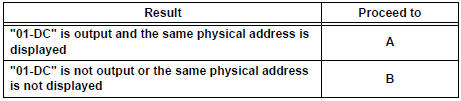
- If "01-DC" is output for any other components, check if the same physical address is displayed.
HINT: For the list of the components shown by sub-codes, refer to the table in step 2.
Result
2 IDENTIFY THE COMPONENT WHICH HAS STORED THIS CODE
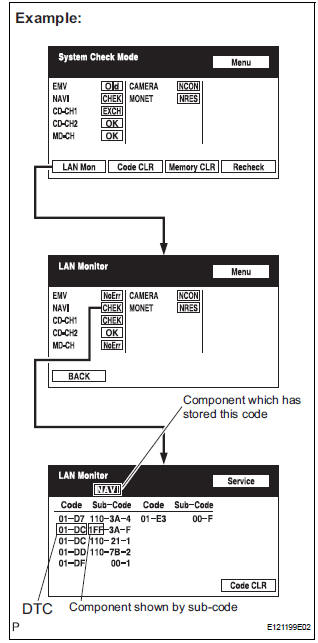
- Enter the diagnostic mode.
- Press the "LAN Mon" switch to change to "LAN Monitor" mode.
- Identify the component which has stored this code.
Component Table:
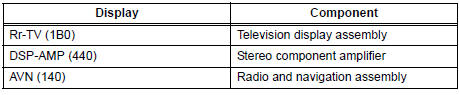
HINT: "NAVI" is the component which has stored this code in the example shown in the illustration.
3 CHECK COMPONENT WHICH HAS STORED THIS CODE
- Select the component which has stored this code.
Component Table:

END
4 CLEAR DTC
- Clear the DTCs.
HINT: If "01-DC" is output for only one component, this may not indicate a malfunction.
5 RECHECK DTC
- Recheck for DTCs and check if the same trouble occurs again.
OK: Malfunction disappears
END
 No Master/ Connection Check Error
DTC 01-D6 No Master
DTC 01-D7 Connection Check Error
DESCRIPTION
DTC No.
DTC Detection Condition
Trouble Area
01-D6
*1
When either of the following condition ...
 Master Reset/ Voice Processing Device ON Error
DTC 01-DD Master Reset
DTC 01-E1 Voice Processing Device ON
DESCRIPTION
DTC No.
DTC Detection Condition
Trouble Area
01-DD
*1
The device that should be the m ...
Other materials:
Removal
1. DISCHARGE FUEL SYSTEM PRESSURE
HINT:
See page FU-1.
2. DISCONNECT CABLE FROM NEGATIVE BATTERY
TERMINAL
3. REMOVE NO. 1 ENGINE UNDER COVER
4. DRAIN ENGINE COOLANT (See page CO-6)
5. REMOVE FRONT WIPER ARM HEAD CAP (See page
WW-4)
6. REMOVE FRONT WIPER ARM RH (See page WW-4)
7. REMOVE FRO ...
Data list / active test
1. DATA LIST
HINT:
Reading the DATA LIST displayed on an intelligent tester
enables values, including those of the switches, sensors,
and actuators, to be checked without removing any
parts. Reading the DATA LIST as the first step in
troubleshooting is one method to shorten diagnostic
time.
...
Removal
1. REMOVE INSTRUMENT CLUSTER FINISH PANEL
CENTER NO.1 (See page IP-8)
2. REMOVE INSTRUMENT CLUSTER FINISH PANEL
CENTER NO.2
3. REMOVE SHIFT LEVER KNOB SUB-ASSEMBLY
HINT:
(See page AX-146 for U151E, AX-146 for U151F)
4. REMOVE INSTRUMENT CLUSTER FINISH PANEL
ASSEMBLY CENTER (See page IP-9)
5 ...
