
Toyota Sienna Service Manual: Voice is not Recognized
INSPECTION PROCEDURE
1 CHECK NAVIGATION SETTINGS
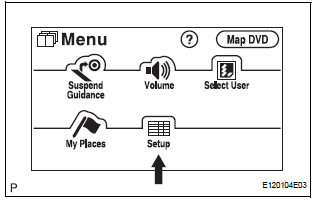
- Enter the "Menu" screen by pressing the "MENU" switch.
- Select "Setup
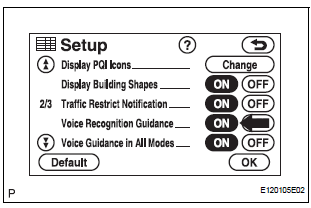
- Check that "Voice Recognition Guidance" is not OFF.
OK: Voice Recognition Guidance is not OFF.
2 CHECK MAP DISC
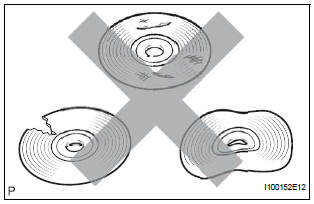
- Check that the map disc is not deformed or cracked.
OK: No deformations or cracks on map disc.
3 CHECK MAP DISC
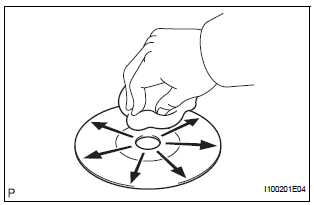
- Check for dirt on the map disc surface.
OK: No dirt is on the map disc surface.
NOTICE: Do not use a conventional record cleaner or antistatic preservative.
HINT: If the disc is dirty, clean the disc by wiping the disc's surface radially with a soft cloth.
4 CHECK MICROPHONE (NAVIGATION CHECK MODE)
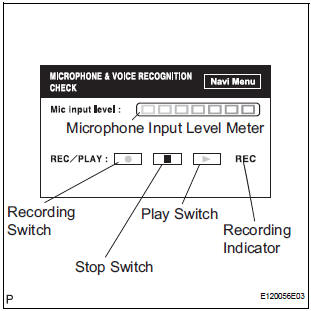
- Enter the "MICROPHONE & VOICE RECOGNITION CHECK" mode.
- When voice is input into the microphone, check that the microphone input level meter changes according to the input voice.
- Push the recording switch and perform voice recording.
HINT: Voice can be recorded up to 5 seconds.
- Check that the recording indicator remains on while recording and that the recorded voice is played normally without noise or distortion.
OK: All check results are normal.
REPLACE RADIO AND NAVIGATION ASSEMBLY
 Voice Recognition Difficulty
INSPECTION PROCEDURE
1 CHECK CONDITION
Check if the system's voice recognition level is low by
using only one particular voice.
OK:
System's voice recognition level is low with any
voice.
...
 Cellular Phone Registration Failure, Phone Directory Transfer Failure
INSPECTION PROCEDURE
1 CHECK CURRENT CONDITIONS
Proceed to the next step according to the table below.
RESULT
2 CHECK USING ANOTHER CELLULAR PHONE
Check if the system functions using an ...
Other materials:
SPD Signal Error
DTC 58-43 SPD Signal Error
DTC 80-43 SPD Signal Error
DESCRIPTION
DTC No.
DTC Detection Condition
Trouble Area
58-43
A difference between the GPS speed and SPD pulse is
detected.
Speed signal circuit
Radio and navigation assembly
...
Power window master
switch
Inspection
1. INSPECT POWER WINDOW REGULATOR MASTER SWITCH ASSEMBLY (w/ Jam
Protection Function)
Check the resistance between the terminals of the
switch when the switch is operated.
Standard:
AUTO (driver side) switch
Passenger side switch
Rear LH switch
Rear RH switch
...
Short in Rear Curtain Shield Squib LH Circuit
DTC B1635/87 Short in Rear Curtain Shield Squib LH Circuit
DESCRIPTION
The rear curtain shield squib LH circuit consists of the center airbag sensor
assembly and the curtain
shield airbag assembly LH.
The circuit instructs the SRS to deploy when deployment conditions are met.
DTC B1635/87 ...
