
Toyota Sienna Service Manual: Wrong Disc/ Disc cannot be Read
DTC 44-41 Wrong Disc
DTC 44-42 Disc cannot be Read
DESCRIPTION
|
DTC No. |
DTC Detecting Condition |
Trouble Area |
|
44-41 |
An unsuitable disc is inserted |
|
|
44-42 |
The disc cannot be read. |
INSPECTION PROCEDURE
HINT: After the inspection is completed, clear the DTCs.
1 CHECK DISC
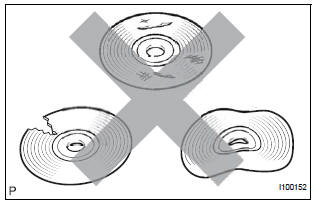
- Check that the disc is not deformed or cracked.
OK: No deformation or cracks on the disc.
2 DISC CLEANING
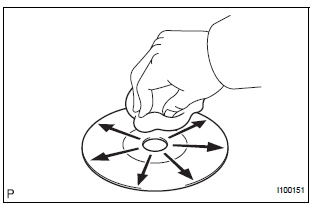
- Disc cleaning
- If dirt is on the disc surface, wipe it clean with a soft cloth from the inside to the outside in a radial direction.
NOTICE: Do not use a conventional record cleaner or anti-static preservative.
3 CLEAR DTC
- Clear the DTCs
4 RECHECK DTC
- Recheck for DTCs and check if the same trouble occurs again.
OK: Malfunction disappears.
5 REPLACE DISC WITH ANOTHER AND RECHECK
- Replace the disc with another and recheck.
- Replace the disc with another normal one.
- Clear the DTCs.
- Recheck for DTCs and check if the same trouble occurs again.
OK: Malfunction disappears
END
 DVD Player Mechanical Error/ DVD Insertion and Ejection Error/ DVD Reading
Abnormal
DVD Player Mechanical Error/ DVD Insertion and Ejection Error/ DVD Reading
Abnormal
DTC 44-10 DVD Player Mechanical Error
DTC 44-11 DVD Insertion and Ejection Error
DTC 44-12 DVD Reading Abnormal
DESCRIPTION
DTC No.
DTC Detecting Condition
Trouble Area
...
 DVD-ROM Abnormal
DTC 44-43 DVD-ROM Abnormal
DESCRIPTION
DTC No.
DTC Detecting Condition
Trouble Area
44-43
DVD-ROM operation is abnormal.
DVD
Television displ ...
Other materials:
Inspection procedure
1 BASIC INSPECTION
Conditions necessary for the power slide door to open:
Power slide door main switch is in the ON position
(switch free: orange paint on the top of the switch
appears).
Slide door is unlocked (door lock position switch is
in the ON position when the slide do ...
GPS Mark is not Displayed
INSPECTION PROCEDURE
1 CHECK CABIN
Check the cabin for any object that might interrupt radio
reception on the instrument panel. If such an object
exists, remove it and check if the GPS mark reappears.
HINT:
The GPS uses extremely faint radio waves originating
from satellites. If the si ...
Customize parameters
HINT:
The following items can be customized.
NOTICE:
After confirming whether the items requested by the
customer are applicable or not for customization,
perform the customize operation.
Be sure to record the current settings before
customizing.
When troubleshooting, make sure that ...
