
Toyota Sienna Service Manual: CD cannot be Inserted / Played or CD is Ejected Right After Insertion
INSPECTION PROCEDURE
1 CHECK IF A PROPER CD IS INSERTED
- Make sure that the CD is an audio CD or a CD with an MP3 or WMA file, and that it is not deformed, flawed, stained, burred, or otherwise defective.
OK: Normal CD.
HINT:
- Translucent or uniquely-shaped CDs cannot be played.
- CDs with adhesive paper labels should not be played.
- Commercial audio CDs can be played.
- CD-DA files on CD-ROMs, CD-Rs, and CD-RWs can be played.
- MP3 and WMA files on CD-ROMs, CD-Rs, and CDRWs can be played.
- For details on playable CDs, refer to the Owner's Manual.
2 CHECK THAT CD IS INSERTED PROPERLY
- Check whether or not the CD is inserted upside down.
OK: CD is properly inserted.
3 CHECK CD
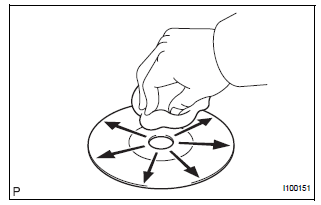
- Clean the disc by wiping it with a soft cloth from the inside to the outside in a radial direction.
OK: Malfunction disappears.
NOTICE: Do not use a conventional record cleaner or antistatic preservative.
END
4 REPLACE CD WITH ANOTHER AND RECHECK
- Replace the CD with a normal one and check that the malfunction disappears.
OK: Malfunction disappears.
END
 CD cannot be Ejected
INSPECTION PROCEDURE
1 PRESS "EJECT" AND CHECK OPERATION
Press the CD EJECT switch of the radio receiver for 2
seconds or more and check that the CD is ejected.
OK:
CD is ejected
...
 CD Sound Skips
INSPECTION PROCEDURE
1 CHECK CD
Check the CD.
OK:
The CD is clean.
HINT:
If dirt is on the CD surface, wipe it clean with a soft cloth
from the inside to the outside in a radial direct ...
Other materials:
Problem symptoms table
POWER WINDOW CONTROL SYSTEM (W/ JAM PROTECTION)
Symptom
Suspected Area
AUTO UP/DOWN function does not operate
Power window regulator motor assembly (Driver side)
Wire harness
Power window regulator master switch assembly
Remote ...
Tire Pressure Warning Reset Switch Circuit
DESCRIPTION
The ECU enters the initialization mode and performs initialization
automatically, when the tire pressure
warning ECU receives the signal from the tire pressure warning reset switch. If
the ECU receives the
signal, the tire pressure warning light blinks 3 times (1 second on, 1 seco ...
Selecting, fast-forwarding and reversing tracks/files/songs
Selecting a track/file/song
Press the “� or “� button on “SEEK•TRACK� or turn the
“TUNE•SCROLL� knob to select the desired track/file/song number.
To fast-forward or reverse, press and hold the “� or “� button on
“SEEK•TRACK�.
...
