
Toyota Sienna Service Manual: Engine Coolant Temperature Circuit Range / Performance Problem

DESCRIPTION
Refer to DTC P0115 (See page ES-133).
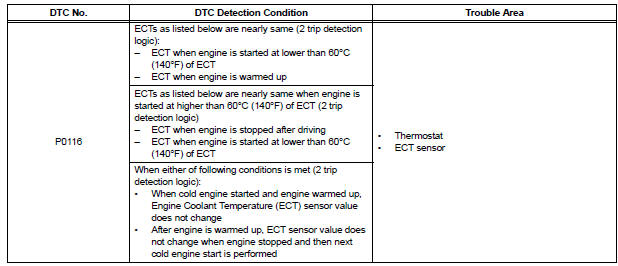
MONITOR DESCRIPTION
The ECT sensor is used to monitor the ECT. The ECT sensor has a built-in thermistor with a resistance that varies according to the temperature of the engine coolant. When the ECT becomes low, the resistance of the thermistor increases. When the temperature becomes high, the resistance drops. These variations in the resistance are reflected in the voltage output from the ECT sensor.
The ECM monitors the sensor voltage and uses this value to calculate the ECT. If the sensor voltage output deviates from the normal operating range, the ECM interprets this deviation as a malfunction in the ECT sensor and sets the DTC.
Examples:
- Upon starting the engine, the ECT is between 35°C and 60°C (95°F and 140°F). If the ECT remains within 3°C (5.4°F) of the stating temperature after driving for 250 seconds, the DTC is set (2 trip detection logic).
- Upon starting the engine, the ECT is over 60°C (140°F). If the ECT remains within 1°C (1.8°F) of the starting temperature after driving for 250 seconds, the DTC is set (6 trip detection logic).
MONITOR STRATEGY
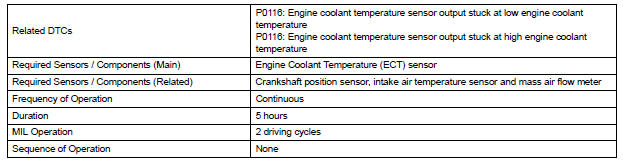
TYPICAL ENABLING CONDITIONS
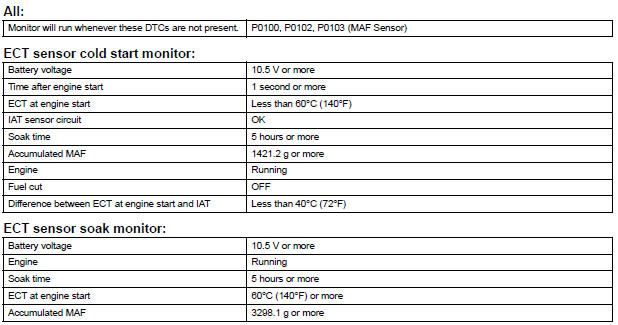
TYPICAL MALFUNCTION THRESHOLDS

COMPONENT OPERATING RANGE

INSPECTION PROCEDURE
HINT:
- If any of DTC P0115, P0117, P0118 or P0125 are set simultaneously with DTC P0116, the ECT sensor may have an open or a short circuit. Troubleshoot those DTCs first.
- Read freeze frame data using the intelligent tester. The ECM records vehicle and driving condition information as freeze frame data the moment a DTC is stored. When troubleshooting, freeze frame data can be helpful in determining whether the vehicle was running or stopped, whether the engine was warmed up or not, whether the air-fuel ratio was lean or rich, as well as other data recorded at the time of a malfunction.
1 CHECK ANY OTHER DTCS OUTPUT (IN ADDITION TO DTC P0166)
(a) Connect the intelligent tester to the DLC3.
(b) Turn the ignition switch to the ON position.
(c) Turn the tester on.
(d) Enter the following menus: DIAGNOSIS / ENHANCED II / DTC INFO / CURRENT CODES.
(e) Read the DTC.
Result 


2 INSPECT THERMOSTAT
(a) Remove the thermostat (See page CO-16).
(b) Check the valve opening temperature of the thermostat.
Standard: 80 to 84°C (176 to 183°F)
HINT:
In addition to the above check, confirm that the valve is completely closed when the temperature is below the standard.
(c) Reinstall the thermostat (See page CO-17).


REPLACE ENGINE COOLANT TEMPERATURE SENSOR
 Engine Coolant Temperature Circuit
DESCRIPTION
A thermistor is built into the Engine Coolant Temperature (ECT) sensor, of
which the resistance value
varies according to the ECT.
The structure of the sensor and its connection ...
 Engine Coolant Temperature / Intake Air Temperature Correlation
DESCRIPTION
The ECM calculates the difference between the readings of the coolant
temperature sensor and intake air
temperature sensor. If the difference is greater than 20°C (68°F), the ECM ...
Other materials:
Reassembly
1. INSTALL REAR DISC
(a) Aligning the matchmarks, install the rear disc.
HINT:
Select the installation position where the disc has
the minimum runout.
2. INSPECT DISC RUNOUT
(a) Temporarily fasten the disc with the hub nuts.
Torque: 103 N*m (1,050 kgf*cm, 76 ft.*lbf)
(b) Using a di ...
Front Speed Sensor RH Circuit
DESCRIPTION
The speed sensor detects wheel speed and transmits the appropriate signals to
the ECU. These signals
are used for control of the ABS control system. The front and rear rotors have
48 serrations each.
When the rotors rotate, the magnetic field generated by the permanent magne ...
Sliding doors
Vehicles without power sliding doors
The sliding doors can be opened and closed using the sliding
door handle. The sliding door can be locked and unlocked using
the wireless remote control, door lock switch or inside lock
knob.
Vehicles with power sliding doors
...
