
Toyota Sienna Service Manual: VIN not Programmed or Mismatch - ECM / PCM

DESCRIPTION
DTC P0630 is set when the Vehicle Identification Number (VIN) is not stored in the Engine Control Module (ECM) or the input VIN is not accurate. Input the VIN with the intelligent tester.

MONITOR STRATEGY
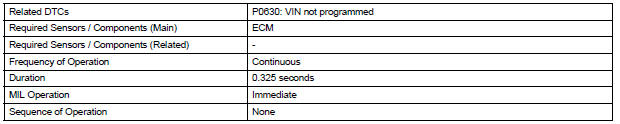
TYPICAL ENABLING CONDITIONS

TYPICAL MALFUNCTION THRESHOLDS

COMPONENT OPERATING RANGE

INSPECTION PROCEDURE
1 READ CURRENT DTC
(a) Connect the intelligent tester to the DLC3.
(b) Turn the ignition switch to the ON position and turn the tester on.
(c) Select the following menu items: DIAGNOSIS / ENHANCED OBD II / DTC INFO / CURRENT CODES.
(d) Read the DTCs.
Result 
If any DTCs other than P0630 are output, troubleshoot those DTCs first.
| NOTICE: If P0630 is set, the VIN must be input to the ECM using the intelligent tester. However, all DTCs are cleared automatically by the tester when inputting the VIN. If DTCs other than P0630 are set, check them first. |



HINT: Refer to "REGISTRATION" (See page ES-15).

3 READ CURRENT DTC
(a) Connect the intelligent tester to the DLC3.
(b) Turn the ignition switch to the ON position and turn the tester on.
(c) Select the following menu items: DIAGNOSIS / ENHANCED OBD II / DTC INFO / CURRENT CODES.
(d) Read the DTCs again.
Result: DTC is not output (P0630).


END
 Starter Relay Circuit High
MONITOR DESCRIPTION
While the engine is being cranked, the positive battery voltage is applied to
terminal STA of the ECM.
If the ECM detects the Starter Control (STA) signal while the vehic ...
 Actuator Supply Voltage Circuit / Open
DESCRIPTION
The ECM monitors the output voltage to the throttle actuator. This self-check
ensures that the ECM is
functioning properly. The output voltage is usually 0 V when the ignition swit ...
Other materials:
The keys
The following keys are provided with the vehicle.
Vehicles without a smart key system
Master keys (black)
Valet key (gray)
Key number plate
Vehicles with a smart key system
Electronic keys
Operating the smart key system
Operating the wireless remote
contr ...
Short to GND in Side Squib LH Circuit
DTC B0117/45 Short to GND in Side Squib LH Circuit
DESCRIPTION
The side squib LH circuit consists of the center airbag sensor assembly and
the front seat side airbag
assembly LH.
This circuit instructs the SRS to deploy when deployment conditions are met.
DTC B0117/45 is recorded when a s ...
U151e automatic transaxle
SERVICE DATA
TORQUE SPECIFICATIONS
...
